Travel photo organizer
Your trip photos, sorted by where you took them
A camera roll sorts by date, so a trip ends up as three hundred photos in a row. MyTripLog files each photo under the place you took it, and saves the original into a tidy folder in your own cloud storage: one folder per trip, one per day, and each file named after the place and the date.
Free · Google Drive · Dropbox · OneDrive
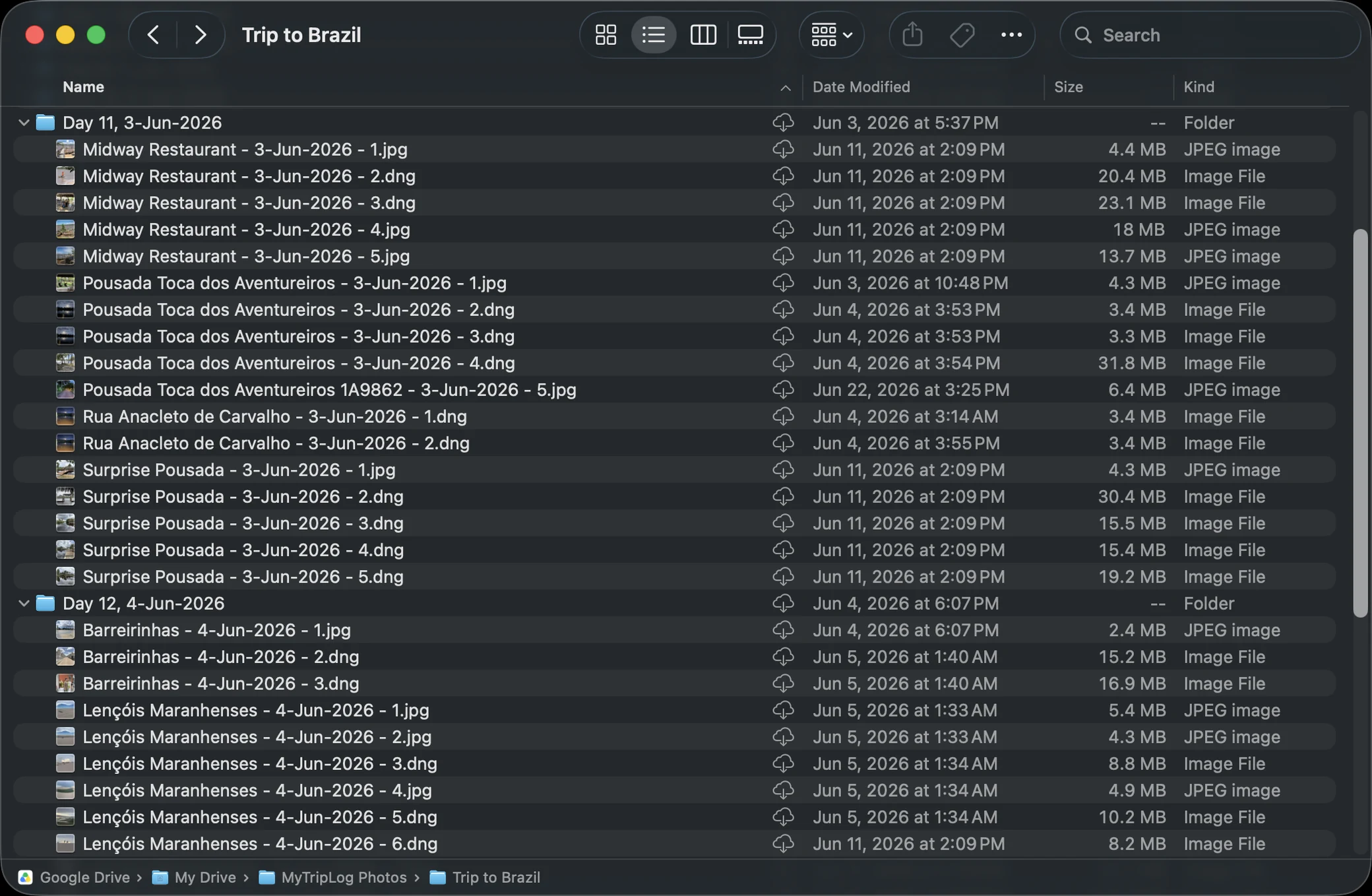
.dng files are the camera's RAW originals, stored as they
came off the card.
Three ways photos find their place
However a photo arrives, it ends up in the same place: on a waypoint, the stop in your trip where you took it. That's what lets MyTripLog put it in the right folder, on the map and in the story of the day.
Take it in the app
Take a photo in MyTripLog and it becomes a waypoint on its own, placed and named from where you're standing. Or add photos to a stop you've already logged.
Drop in your camera's folder
MyTripLog groups the photos by when they were taken and matches each group to a waypoint you logged nearby. You confirm everything on a map before anything is saved.
Start from a photo you already have
Pick a photo from your gallery and MyTripLog makes a waypoint from it, using the location and time stored in the photo.
A folder of photos, and a trip
MyTripLog isn't another place to store photos. You already have one, and your photos stay in it. What changes is that they arrive organized, and they come with the rest of the trip.
Questions
Does MyTripLog copy my photos to its own servers?
No. The full-resolution photos go straight from your device to your own Google Drive, Dropbox or OneDrive. MyTripLog keeps only small previews, so the app and your share links can show them.
Are my photos resized or compressed?
No, they are stored at full resolution. Files you add are kept in their own format, RAW included, except HEIC, which is saved as a high-quality JPEG. Photos taken with the camera inside the app are saved as JPEG.
Can I add the photos from my camera after the trip?
Yes, in the desktop app. Drop a folder of photos onto a trip, up to 100 at a time. MyTripLog groups them by when they were taken and matches each group to a waypoint you already logged nearby. Anything it isn't sure about is shown on a map for you to confirm before anything is saved.
Which cloud storage services work?
Google Drive, Dropbox and OneDrive. Each trip is connected to one of them, because that is where its photos go.
What if I stop using MyTripLog?
Your photos stay in your storage, still sorted into their trip and day folders and named after their places. You can also save a trip archive beside them: a readable web page, a GPX file of the route, and a data file you can import back into MyTripLog later.
How a photo travels from your phone to your storage is drawn out on How MyTripLog works.
Related
Give your next trip's photos a place to live.
Create a free account, connect your storage, and log your first waypoint.