Private travel journal
A travel journal that stays yours
MyTripLog keeps a record of each trip: every place you stopped, the moment you were there, what you wrote about it and the photos worth keeping. A trip is visible only to you until you choose to share it, and your full-resolution photos go to your own Google Drive, Dropbox or OneDrive. They never pass through MyTripLog's servers.
Free · no subscription · no ads
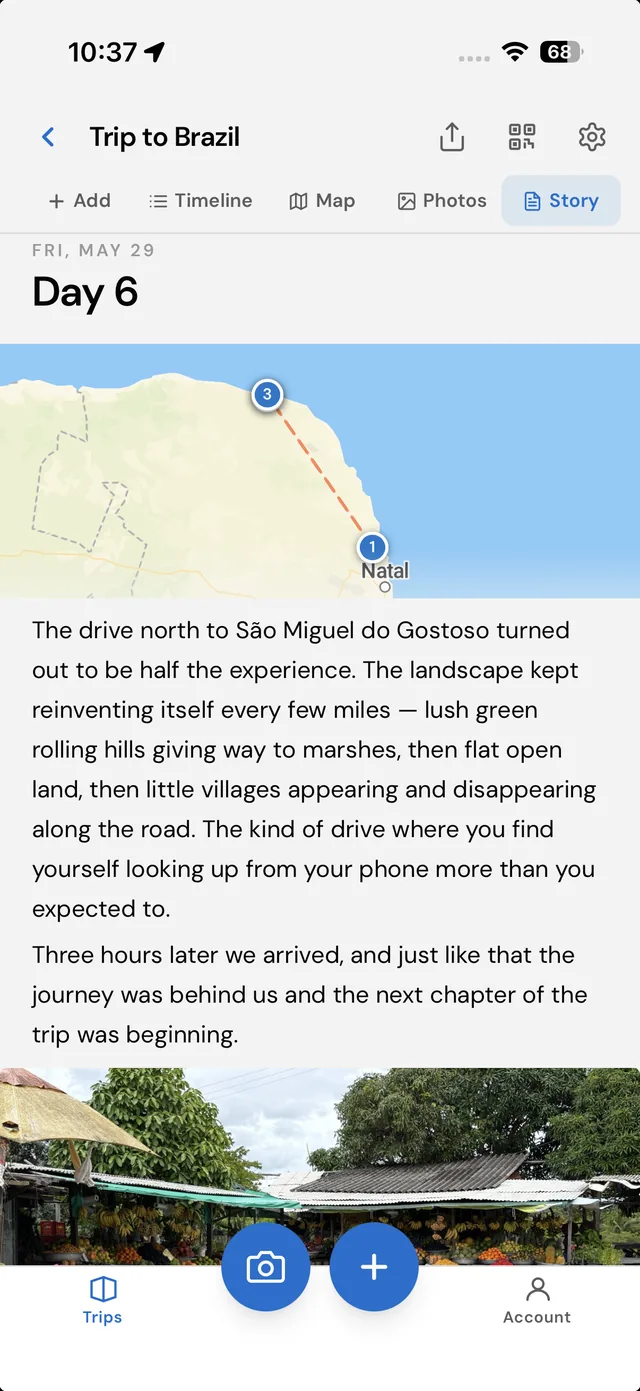
A journal, not a feed
There are no followers, no likes and no public profile. Nothing you log is published anywhere. You write for yourself, and you can be as honest as you like about the hotel.
Each stop is a waypoint: a place, a time, your notes, a rating and any photos you want to add. MyTripLog groups the waypoints by day, draws them on a map, and turns each day into a story you can read back later.
Log a waypoint on your phone in a couple of taps while you're there. You can add the writing later, at home. It works without signal too: the waypoint waits on your phone and uploads itself when you're back online.
What "private" means here
Most travel apps keep your photos on their own servers. MyTripLog doesn't, so here is exactly what sits where. The same split is drawn out step by step on How MyTripLog works.
In your own cloud storage
- Your photos, at full resolution. Filed by trip and by day, in a MyTripLog Photos folder in the account you connect.
- A readable copy of the trip, if you save one: a web page, a GPX file of the route, and a data file you can import again later.
- Everything stays there if you leave. Deleting your MyTripLog account doesn't touch these files.
With MyTripLog
- Your trips and waypoints. Places, times, notes and ratings.
- Small previews of your photos, so the app and your share links can show them.
- A pointer to each original in your storage: where it is, not the file itself.
Private until you share it, and only as far as you choose
Sharing is per trip and off by default. When you want family to follow along, you turn on one link, and you can turn it off again whenever you like.
Visible only to you
A new trip has no link at all. There is nothing to find and nothing indexed.
One read-only link
Whoever you send it to opens the map, the timeline and the photos, with no account. Your email address and name aren't shown.
Revoke it or make a new one
Switch the link off and it stops working immediately. Or make a new link, so the old one no longer opens.
Questions
Can anyone else see my trips?
No. A trip is visible only to you until you turn on its share link. The link is read-only: whoever has it can see the trip's waypoints, notes and photo previews without an account, and never sees your email address or name. You can revoke it at any time, and it stops working immediately.
Where are my photos stored?
The full-resolution photos go straight from your phone or computer to the Google Drive, Dropbox or OneDrive account you connect, into a folder called MyTripLog Photos. They never pass through MyTripLog's servers. MyTripLog keeps only small previews, so the app and your share links can show them.
Does MyTripLog track my location?
No. The app asks for your location only while you are logging a waypoint, and never in the background. It keeps the places you choose to save, not the path you moved along.
What happens to my photos if I delete my account?
Your trips, waypoints and previews are removed from MyTripLog. The originals in your own cloud storage are deliberately left where they are. They were always yours.
Is it free?
Yes. There is no subscription and no advertising, and your data is not sold.
The full detail is in the privacy policy.
Related
Keep your next trip for yourself.
Create a free account and log your first waypoint in under a minute.